


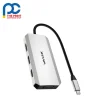


The Wavlink UMD307 Pro is a compact USB-C docking station for up to four monitors, using two DisplayPort outputs, one HDMI port and one VGA port. On Windows laptops with DP 1.4 and DSC, a DisplayPort screen can run at 8K@60Hz, and the dock supports triple 4K@60Hz output. A USB-C PD 3.0 input passes up to 95W to your laptop, and three USB 2.0 ports connect your peripherals.

Powerful laptops used for video editing, design and gaming often need both high-resolution screens and strong charging from the same connection. The Wavlink UMD307 Pro handles both: an 8K@60Hz DisplayPort output on capable Windows hosts, up to four monitors in total, and up to 95W of pass-through charging when you connect your own USB-C power adapter. It is plug and play with no drivers, and its sturdy, lightweight aluminium alloy shell helps it stay cool while making it easy to carry between desk, home and meeting room.
Who is the Wavlink UMD307 Pro for?
The Wavlink UMD307 Pro suits video editors, image designers, gamers and multitasking office users with a laptop that has a full-function USB-C port, running Windows 11/10/8/7 or macOS 10.8 or later. A typical setup has an 8K or 4K monitor on each DisplayPort, a third 4K screen on HDMI and an older display or projector on VGA, with a keyboard, mouse and printer on the USB 2.0 ports. Plug your own USB-C power adapter (up to 100W) into the PD IN port. On Windows, the laptop screen turns off in quad-display mode.
Wavlink UMD307 Pro key features
- Quadruple display: Two DisplayPort outputs, one HDMI port and one VGA port support up to four external monitors. On Windows the laptop screen turns off in quad-display mode, while macOS mirrors the same content.
- 8K@60Hz DisplayPort: On Windows laptops with DP 1.4 and DSC, a DisplayPort screen can run at up to 8K@60Hz, giving video editors, designers and 8K gamers exceptional detail and clarity.
- Triple 4K@60Hz: Both DisplayPort outputs and the 4K@60Hz HDMI port combine for triple 4K@60Hz output, while the VGA port adds a 1080p@60Hz screen for older monitors or projectors.
- 95W pass-through charging: The USB-C PD 3.0 input accepts up to 100W and provides up to 95W of pass-through charging to your laptop. A power adapter is not included, so use your own USB-C charger.
- Three USB 2.0 ports: Three USB-A 2.0 ports at 480Mbps connect keyboards, mice, printers and flash drives, keeping your everyday accessories ready whenever you plug in the dock.
- Light aluminium alloy body: The Wavlink UMD307 Pro measures 111 x 50 x 15mm, weighs just 88g and has a 25cm cable, with an aluminium alloy shell that is sturdy, portable and designed to stay cool.
Wavlink UMD307 Pro specifications
| Model | WL-UMD307-Pro |
|---|---|
| Ports | 1 x HDMI (4K@60Hz), 2 x DP (8K@60Hz), 1 x PD IN (100W max), 1 x VGA (1080p@60Hz), 3 x USB 2.0-A (480Mbps) |
| Display | Quadruple display; triple 4K@60Hz; single 8K@60Hz (Windows, DP 1.4 with DSC) |
| Laptop charging | Up to 95W pass-through, USB-C PD 3.0; power adapter not included |
| USB | 3 x USB 2.0, 480Mbps |
| Plug & play | Supported, driver-free |
| Operating systems | Windows 7/8/10/11, macOS 10.8 or later |
| Dimensions | 111 x 50 x 15mm |
| Weight | 88g |
| Cable length | 25cm |
| Shell material | Aluminium alloy |
Full technical details are available on the official Wavlink product page.
What’s in the box with the Wavlink UMD307 Pro
- 1 x Wavlink UMD307 Pro USB-C quad display docking station
- 1 x Quick start guide
Wavlink UMD307 Pro FAQs
Is a power adapter included with the Wavlink UMD307 Pro?
No, a power adapter is not included. Connect your own USB-C power adapter to the PD IN port, which accepts up to 100W, and the dock provides up to 95W of PD 3.0 pass-through charging to your laptop.
How do I get 8K@60Hz from the Wavlink UMD307 Pro?
Connect an 8K monitor to one of the DisplayPort outputs on a Windows laptop whose USB-C port supports DP 1.4 with DSC. Laptops without DSC or with an older DP version may only reach lower resolutions.
Can I use four monitors on a Mac?
You can connect multiple monitors, but on macOS all external displays show the same mirrored content rather than separate desktops. On Windows, four displays can show different content, with the laptop screen turning off in quad-display mode.
Do I need to install any drivers?
No. The dock is plug and play and driver-free on Windows 11/10/8/7 and macOS 10.8 or later. Your laptop does need a full-function USB-C port that supports video output and charging.
Why buy the Wavlink UMD307 Pro from The Print Cartridge Shop
We are an Australian online store, and every Wavlink UMD307 Pro we sell is a genuine Wavlink product. Orders are packed within 1–2 business days and sent with tracking to every Australian state under our shipping policy. You can return a change-of-mind purchase within 30 days under our returns policy, and faulty items are covered by the Australian Consumer Law.
Browse more Wavlink docking stations and adapters or see all products from the Wavlink brand. Not sure the Wavlink UMD307 Pro suits your setup? Contact our team and we will help you check before you order.


Reviews
There are no reviews yet