



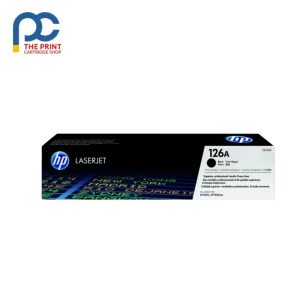
HP 126A Black is a genuine HP toner cartridge from The Print Cartridge Shop, dispatched fast to every Australian state.
The HP 126A CE310A is the black toner for HP’s compact Color LaserJet Pro printers, rated at about 1,200 pages. It handles all your everyday text, so a genuine replacement keeps documents looking clean and easy to read.
Key details
- HP cartridge number: 126A
- HP part number: CE310A
- Colour: Black
- Rated yield: Approximately 1,200 pages to ISO/IEC 19798
- Pack contents: 1 x HP 126A black toner cartridge
- Genuine HP product
Suits the following printers
HP LaserJet Pro 100 color MFP M175a, HP LaserJet Pro 100 color MFP M175nw, HP LaserJet Pro 200 color MFP M275nw, HP LaserJet Pro CP1025 Color, HP LaserJet Pro CP1025nw Color, HP TopShot LaserJet Pro M275 MFP
Good to know
Is the HP 126A Black genuine?
Yes. The HP 126A Black is a genuine HP product and arrives new in its original packaging.
Do I need a new drum when I change the 126A toner?
Not usually. Printers that take 126A use a separate HP 126A imaging drum that lasts much longer than the toner. Replace it only when the printer asks.
What is the difference between 126A and CE310A?
126A is HP’s cartridge number, and CE310A is the part number for the black version. They describe the same cartridge.
How to install the HP 126A Black
- Open the front or top cover and let the printer cool for a few minutes if it has just been printing.
- Remove the used cartridge. On printers with a separate drum unit, take out the drum and toner together, then push the lock lever and lift the toner cartridge out of the drum.
- Unpack the new cartridge and gently rock it side to side five or six times to spread the toner evenly. Remove any protective strip or cover.
- Slide the cartridge into place (or into the drum unit until it clicks), refit the assembly and close the cover.
Storage and handling
Keep unopened cartridges in their packaging in a cool, dry place and lay them horizontally. If you spill toner, wipe it up with a dry cloth and cold water rather than a vacuum cleaner.
Getting the most from each cartridge
Page yields such as 1,200 pages are measured at about 5% coverage, so pages with heavy graphics will use toner faster. Printing in draft or toner save mode helps your cartridge last longer, and keeping the paper path clean helps avoid smudges.
Delivery, returns and support
Orders are packed within 1–2 business days and sent with tracking to every Australian state for a flat $19.99 delivery fee. Change your mind? Let us know within 30 days of delivery under our returns policy, and faulty items are covered by Australian Consumer Law. Not sure this is the right part for your machine? Send us your printer model and we will confirm before you order.




Reviews
There are no reviews yet