
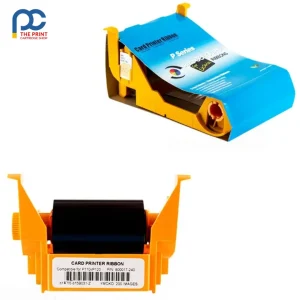


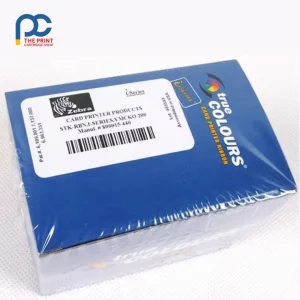
The Zebra 800017-240 ribbon is a genuine Zebra YMCKO colour cartridge that produces up to 200 full-colour, single-sided ID cards per roll. It is built for offices, schools, gyms and clubs running a Zebra P100i, P110i or P120i card printer that need vivid photo IDs with crisp black text. Because it is a drop-in cartridge with its own cleaning roller, changeovers take seconds and every card starts dust-free.

Key features
- Genuine Zebra consumable, part number 800017-240
- Five panels: yellow, magenta, cyan, resin black (K) and a clear overlay (O)
- Up to 200 full-colour card images per ribbon
- Card-cleaning roller included with each ribbon
- Resin black panel prints sharp text and scannable barcodes
- Clear overlay panel adds a protective layer against everyday wear
- Replaces the earlier Zebra 800015-940 colour ribbon
Technical specifications
| Brand | Zebra (genuine) |
|---|---|
| Part number | 800017-240 |
| Ribbon type | Standard colour, YMCKO |
| Panels | Yellow, magenta, cyan, black resin, clear overlay |
| Yield | Up to 200 prints per ribbon |
| Cleaning roller | Included |
| Replaces | 800015-940 |
| Barcode (EAN/UPC) | 791836522063 |
| Printers | Zebra P100i, P110i, P120i |

Suits these Zebra models
This Zebra 800017-240 ribbon is designed for use in the Zebra P100i, P110i and P120i card printers. Older stock of the same ribbon may carry the 800015-940 part number, which this cartridge replaces. It is not the ribbon used by the ZXP Series 1, ZXP Series 3 or ZC range, so please check the model label on your printer before ordering.
Card printers in the P1xxi family were popular with small organisations because they pair a compact body with drop-in ribbons, and the Zebra 800017-240 ribbon keeps those machines productive. If your fleet mixes P100i, P110i and P120i units, a single ribbon part number covers all three, which makes ordering and storing spares far simpler for office managers.
Each cartridge carries a full panel set for one card at a time, so the yield figure applies to single-sided full-colour cards. When you only need black text, a monochrome ribbon will usually give a far higher card count for the same job.
What’s in the box
One Zebra 800017-240 ribbon cartridge with an integrated card-cleaning roller, ready to drop into the printer.
Setup and care tips
Open the printer lid, lift out the empty cartridge and drop the fresh cartridge into place with the cleaning roller facing the card path. Peel the protective wrap from the cleaning roller before closing the lid, otherwise cards will not be cleaned and print quality will suffer. The printer reads the new ribbon and is ready to print once the lid is shut.
Store spare ribbons flat in their sealed packaging, away from heat, humidity and direct sun. Handle cards by the edges so skin oils do not reach the print surface, and use clean, flat PVC cards for the most even colour.
If you notice streaks or dropouts, clean the printhead with a Zebra cleaning card or a lint-free swab lightly dampened with 99% isopropyl alcohol, then let it dry before printing again.
Not sure the Zebra 800017-240 ribbon is the right choice for your setup? Send us your model number and we will confirm it before you order.
Frequently asked questions
How many cards does one Zebra 800017-240 ribbon print?
Each ribbon is rated for up to 200 single-sided full-colour card images. Yield can be lower if you reprint cards or stop a job mid-way.
Will this ribbon work with a ZXP Series 1 printer?
No. The Zebra 800017-240 ribbon is designed for the P100i, P110i and P120i. ZXP Series 1 printers use their own dedicated ribbons, so match the ribbon to your printer model.
What does the O panel do?
The final clear overlay panel seals the colour image, helping cards resist scuffs and fading from daily handling. It is applied automatically after the colour and black panels.
Suits the following printers
Zebra P100i, Zebra P110i, Zebra P120i




Reviews
There are no reviews yet