


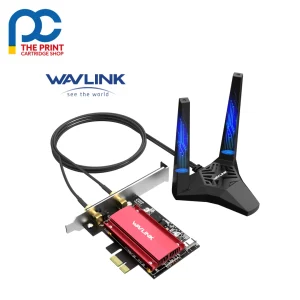


The Wavlink WN675X3 is an AX5400 tri-band WiFi 6E PCIe adapter for desktops, built on the Intel AX210 chipset with Bluetooth 5.3. It connects on 2.4GHz at up to 574Mbps, 5GHz at up to 2400Mbps and the new 6GHz band at up to 2400Mbps, using 802.11ax features such as OFDMA, MU-MIMO, 1024QAM and Target Wake Time.

Busy homes put a lot of devices on the 2.4GHz and 5GHz bands, which can cause lag and dropouts. The Wavlink WN675X3 opens up the 6GHz band of a WiFi 6E router, giving your desktop a cleaner channel for low-latency gaming, VR and large downloads, while still using 5GHz for 4K streaming and 2.4GHz for longer range. Bluetooth 5.3 lets you connect controllers, headphones and keyboards from the same card, and WPA3 support adds stronger protection against password brute-force attacks.
Who is the Wavlink WN675X3 for?
This card is made for desktop PCs with a free PCIe x1, x4, x8 or x16 slot running Windows 10/11 64-bit or Linux. Note that 6GHz needs Windows 11. To install, power off the PC, peel the protective film from the gold contacts, fit the Wavlink WN675X3 using the standard or low-profile bracket, and connect the Bluetooth cable to a 9-pin USB header on the motherboard. Place the magnetic antenna base on the desk or the case, install the driver from Wavlink's website and turn off any built-in WiFi.
Wavlink WN675X3 key features
- Tri-band WiFi 6E: Uses 2.4GHz, 5GHz and 6GHz bands with 20, 40, 80 and 160MHz channel widths, giving you access to the less crowded 6GHz spectrum on WiFi 6E routers.
- AX5400 speeds: Up to 2400Mbps on 6GHz, 2400Mbps on 5GHz and 574Mbps on 2.4GHz. Pair it with a WiFi 6 or 6E router for the best wireless performance.
- Intel AX210 chipset: 802.11ax technology including OFDMA, MU-MIMO, BSS Colouring, 1024QAM and Target Wake Time keeps the connection efficient and responsive in congested networks.
- Bluetooth 5.3: Connect game controllers, headphones and keyboards with Bluetooth 5.3 for steady links. The Bluetooth function needs the included cable connected to the motherboard.
- 5dBi antennas, magnetic base: Two 5dBi tri-band antennas sit on a magnetised base with a 3.6ft RF cable, so you can place them on the desk or the PC case for the best signal.
- WPA3, heat sink and brackets: WPA3 security, a heat sink to manage temperature, a link LED, and both standard and low-profile brackets for full-size or slim desktop cases.
Wavlink WN675X3 specifications
| Model | WL-WN675X3 |
|---|---|
| Chipset | Intel AX210 |
| Interface | PCIe x1 / x4 / x8 / x16 (not for PCI slots) |
| WiFi standards | IEEE 802.11a/b/g/n/ac/ax |
| Frequency bands | 2.4GHz, 5GHz, 6GHz |
| Wireless speed | 6GHz: 2400Mbps; 5GHz: 2400Mbps; 2.4GHz: 574Mbps |
| Channel width | 20/40/80/160MHz |
| Technologies | MU-MIMO, OFDMA, BSS Colouring, 1024QAM, Target Wake Time |
| Bluetooth | Bluetooth 5.3 |
| Antennas | 2 x 5dBi tri-band on magnetic base, 3.6ft RF cable |
| Security | WPA/WPA2/WPA3, WPA-PSK/WPA2-PSK |
| LED | 1 x Link |
| Operating systems | Windows 10/11 64-bit, Linux (6GHz requires Windows 11) |
| Operating temperature | 0 to 40°C, 10-90% humidity non-condensing |
Full technical details are available on the official Wavlink product page.
What’s in the box with the Wavlink WN675X3
- 1 x Wavlink WN675X3 WiFi 6E PCIe adapter
- 1 x Bluetooth cable
- 1 x External antenna with magnetic base
- 1 x Low-profile bracket
- 2 x Screws
- 1 x Driver download card
- 1 x User manual
Wavlink WN675X3 FAQs
Can the Wavlink WN675X3 use the 6GHz band on Windows 10?
No. The card works with Windows 10 and 11 64-bit and Linux, but Wavlink states that the 6GHz band can only be used on Windows 11. On Windows 10 it connects on 2.4GHz and 5GHz, and you will need a WiFi 6E router for 6GHz.
How do I get Bluetooth working on the Wavlink WN675X3?
Connect the supplied Bluetooth cable from the card to a 9-pin USB header on your motherboard and install the driver. Without the header connection, the Bluetooth part of the card will not work, although WiFi will.
Will it fit my PC?
It fits PCIe x1, x4, x8 and x16 slots in desktop computers, but not older PCI slots or laptops. A low-profile bracket is included for slim cases. Remove the protective plastic film from the gold contacts before inserting it.
Will this card make my internet faster?
It raises the maximum wireless link speed your PC can use and improves reception, but it cannot increase the speed of your router or internet plan. Distance, walls, interference and your router all affect the speeds you actually see.
Why buy the Wavlink WN675X3 from The Print Cartridge Shop
We are an Australian online store, and every Wavlink WN675X3 we sell is a genuine Wavlink product. Orders are packed within 1–2 business days and sent with tracking to every Australian state under our shipping policy. You can return a change-of-mind purchase within 30 days under our returns policy, and faulty items are covered by the Australian Consumer Law.
Browse more Wavlink wireless networking equipment or see all products from the Wavlink brand. Not sure the Wavlink WN675X3 suits your setup? Contact our team and we will help you check before you order.


Reviews
There are no reviews yet