


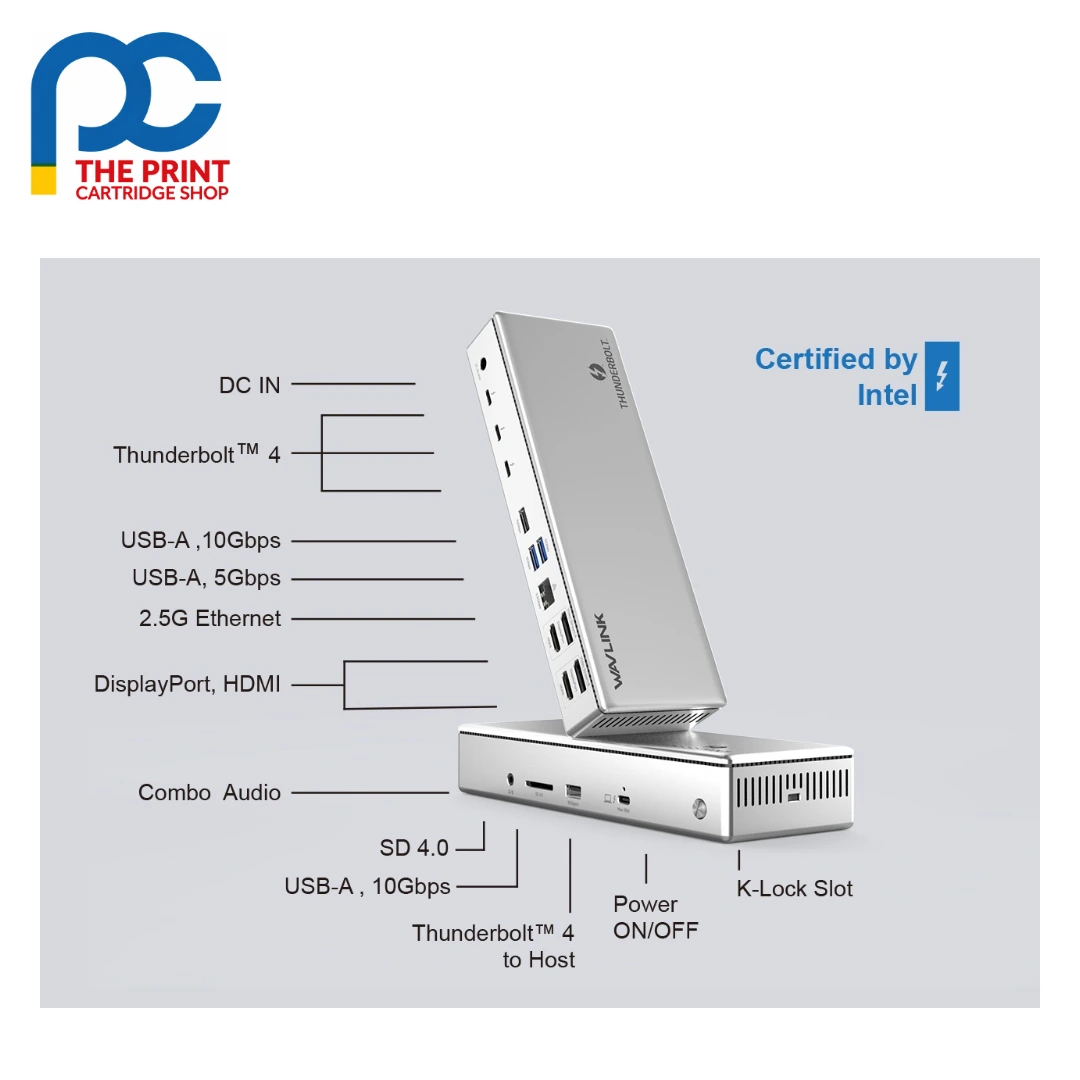


The Wavlink UTD41 is a 15-in-1 Thunderbolt 4 docking station that combines Thunderbolt 4 and DisplayLink technology in an aluminium housing. One 40Gbps Thunderbolt 4 cable charges your laptop at up to 98W and connects up to four 4K@60Hz monitors, or a single 8K@30Hz display, along with 2.5G wired networking, fast USB-A ports, an SD 4.0 card reader and a headset jack.

Most laptops run short of display outputs long before they run short of performance. The Wavlink UTD41 solves this by pairing two native Thunderbolt 4 video outputs with two extra DisplayLink video streams, each offering a choice of HDMI or DisplayPort, so you can run four 4K@60Hz screens from a single cable. The same connection carries 98W of charging power, so there is no separate laptop charger to carry around. The Thunderbolt and USB functions are plug and play, while the HDMI and DisplayPort outputs simply need the DisplayLink driver installed from Wavlink.
Who is the Wavlink UTD41 for?
The Wavlink UTD41 suits people who work across several monitors, such as traders, analysts, developers, video editors and anyone running a multi-screen home office. It works with Windows 10/11 laptops that have a Thunderbolt 4 port and Macs running macOS 11 or later with a Thunderbolt 3 or 4 port. A typical desk might connect two monitors to the downstream Thunderbolt 4 ports, two more to the HDMI or DisplayPort outputs, an external SSD on the spare Thunderbolt port, a keyboard, mouse and webcam on the USB-A ports, and a network cable for fast, stable 2.5G Ethernet.
Wavlink UTD41 key features
- Thunderbolt 4, 40Gbps: The host link and three downstream Thunderbolt 4 ports each offer up to 40Gbps, giving plenty of bandwidth for high-resolution displays, fast external storage and other Thunderbolt or USB-C devices over a single connection.
- Up to four 4K@60Hz displays: Run quad 4K@60Hz using two downstream Thunderbolt 4 ports plus the two DisplayLink video streams (HDMI 2.0 or DisplayPort 1.2 each), or connect a single 8K@30Hz monitor through Thunderbolt 4.
- 98W laptop charging: With the included DC 20V power adapter connected, the Wavlink UTD41 supports USB PD 3.0 and charges your laptop at up to 98W, while the downstream Thunderbolt ports each supply 15W.
- 2.5G Ethernet: The RJ45 port runs at 10/100/1000/2500Mbps for a fast, steady wired connection that is ideal for large file transfers, video calls and cloud backups where WiFi is unreliable.
- Fast USB-A and SD 4.0: Two USB-A 10Gbps and two USB-A 5Gbps ports handle drives and peripherals, and the SD V4.0 reader supports UHS-II cards at theoretical speeds up to 312MB/s.
- Aluminium build and security: The metal housing helps the dock dissipate heat, and the on/off button, power LED, combo audio and microphone jack and Kensington lock slot make it practical for shared and office desks.
Wavlink UTD41 specifications
| Model | WL-UTD41-B |
|---|---|
| Host connection | 80cm Thunderbolt 4 cable, 40Gbps, up to 98W PD (PD 3.0) |
| Thunderbolt downstream | 3 x Thunderbolt 4, 40Gbps, 15W PD charging |
| Video outputs | 2 x HDMI 2.0 and 2 x DisplayPort 1.2 (two video streams, DisplayLink) plus Thunderbolt 4 video |
| Maximum displays | Quad 4K@60Hz or single 8K@30Hz |
| USB-A | 2 x USB-A 10Gbps, 2 x USB-A 5Gbps |
| Ethernet | 1 x RJ45 10/100/1000/2500Mbps |
| Card reader | SD V4.0 (UHS-II, up to 312MB/s theoretical) |
| Audio | TRRS 4-pole headset/microphone jack |
| Other | Power LED, on/off button, Kensington lock |
| Power adapter | DC 20V |
| Drivers | DisplayLink driver needed for HDMI/DisplayPort; other functions plug and play |
| Operating systems | Windows 10/11 (Thunderbolt 4), macOS 11 or later (Thunderbolt 3/4) |
| Dimensions / material | 210 x 83 x 32.5 mm, metal housing |
Full technical details are available on the official Wavlink product page.
What’s in the box with the Wavlink UTD41
- 1 x Wavlink UTD41 Thunderbolt 4 docking station
- 1 x Thunderbolt 4 80cm cable
- 1 x DC 20V power adapter
- 1 x AC power cable
- 1 x Cable holder
- 1 x Quick start guide
Wavlink UTD41 FAQs
Does the Wavlink UTD41 need drivers?
The Thunderbolt 4, USB, Ethernet, card reader and audio functions are plug and play. The two HDMI and two DisplayPort outputs use DisplayLink, so you need to install the driver from Wavlink's website. On macOS, allow the DisplayLink Manager app to record the screen.
How do I connect four monitors to the Wavlink UTD41?
Connect two monitors to any two of the three downstream Thunderbolt 4 ports, then connect the other two to video stream A and video stream B using either the HDMI or DisplayPort in each stream. The HDMI and DisplayPort within the same stream cannot be used at the same time.
Will it work with a Thunderbolt 3 laptop?
Macs with a Thunderbolt 3 or 4 port running macOS 11 or later are supported. Wavlink notes that some functions may not work fully with Thunderbolt 3 laptops in general, so a Thunderbolt 4 laptop gives the best results, particularly on Windows.
Why is my laptop not charging from the dock?
Check that your laptop's USB-C or Thunderbolt port supports power delivery, that the DC 20V adapter is connected, and that you are using the Thunderbolt 4 cable supplied with the dock. When those conditions are met, the dock delivers up to 98W.
Why buy the Wavlink UTD41 from The Print Cartridge Shop
We are an Australian online store, and every Wavlink UTD41 we sell is a genuine Wavlink product. Orders are packed within 1–2 business days and sent with tracking to every Australian state under our shipping policy. You can return a change-of-mind purchase within 30 days under our returns policy, and faulty items are covered by the Australian Consumer Law.
Browse more Wavlink docking stations and adapters or see all products from the Wavlink brand. Not sure the Wavlink UTD41 suits your setup? Contact our team and we will help you check before you order.


Reviews
There are no reviews yet