


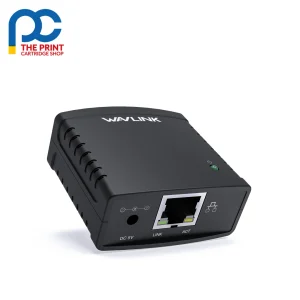
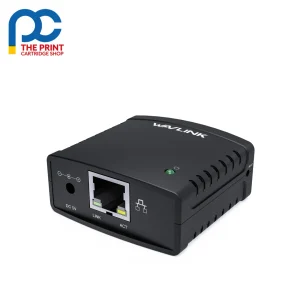


The Wavlink NU78M41 is a palm-sized USB 2.0 LAN print share server that makes any compatible USB printer available to all computer users on your network. It complies with USB 2.0 and is backward compatible with USB 1.1, while its auto-sensing Ethernet port works on 10Base-T or 100Base-T networks. Setup and monitoring are handled through an easy web-based interface.

Keeping a host computer switched on just so others can use a shared USB printer wastes power and causes frustration when that computer is off or busy. The Wavlink NU78M41 connects the printer directly to your router or switch instead, so it becomes a network printer anyone on the LAN can use. That means you can keep a good older USB printer in service rather than buying a new network model, while saving desk space and reducing cable clutter around your computers.
Who is the Wavlink NU78M41 for?
The Wavlink NU78M41 is a good match for homes, small businesses, government offices and educational institutions that need several people to share one USB printer. Connect the power adapter, plug the printer in with its USB cable, and connect the print server to your router or switch using the included Ethernet cable. Then install the printer's driver on each computer and follow the manual to add the printer over the network. Computers on WiFi can print too, as long as they are on the same local network via your wireless router.
Wavlink NU78M41 key features
- Makes a USB printer networked: Converts a USB-only printer into a wired network printer that every computer on the LAN can access, without a host PC that has to stay on.
- USB 2.0 with USB 1.1 support: The USB port complies with USB 2.0 and is backward compatible with USB 1.1, so it suits newer printers as well as older USB models still in good working order.
- 10/100Mbps auto-sensing port: The Ethernet port automatically detects 10Base-T or 100Base-T networks and works with any home or office Ethernet network through your router or switch.
- Web-based management: Configure, monitor and even reset the print server through an intuitive web browser interface, with DHCP and Auto IP support to simplify network settings.
- Broad OS and printer support: Works with Windows XP through 11, Windows Server 2003/2008/2012 and Mac 10.7 or later, and with almost all USB inkjet, laser, needle and multi-function printers.
- Palm-sized design: Measuring 54 x 54 x 25 mm and weighing 37g, the Wavlink NU78M41 fits discreetly behind a printer, with a 100cm Ethernet cable and 120cm power cable.
Wavlink NU78M41 specifications
| Model | WL-NU78M41 |
|---|---|
| USB | USB 2.0 compliant, backward compatible with USB 1.1 |
| Ethernet | 10Base-T/100Base-T auto-sensing RJ45 |
| Protocol | LPR |
| Management | Web-based GUI, DHCP and Auto IP |
| Connection | Wired to router or switch only (no WiFi broadcast) |
| Operating systems | Windows 2003/2008/2012/XP/Vista/7/8/8.1/10/11, Mac 10.7 or later |
| Material / colour | ABS, black |
| Dimensions | 54 x 54 x 25 mm |
| Weight | 37g |
| Cable lengths | Network cable 100cm, power adapter cable 120cm |
Full technical details are available on the official Wavlink product page.
What’s in the box with the Wavlink NU78M41
- 1 x Wavlink NU78M41 networking USB LPR print server
- 1 x RJ45 Ethernet cable
- 1 x Power adapter
- 1 x Instruction manual
Wavlink NU78M41 FAQs
Does the Wavlink NU78M41 need a driver?
The print server itself requires no driver installation. Download and install your printer's driver from the printer maker's website on each computer, then follow the Wavlink manual to set up the print server and add the printer over the network.
Can the Wavlink NU78M41 connect over WiFi?
No. It only connects to a router or switch with a network cable and does not broadcast WiFi. Connect it to your wireless router by Ethernet, and computers using that router's WiFi can still print, provided they are on the same local network.
Is a USB printer cable included?
No. The Ethernet cable is included, but you need to supply the USB cable that connects your printer to the print server. This is usually the same cable you would use to connect the printer directly to a computer.
Which printers and devices are supported?
It works with almost all USB inkjet, laser, needle and multi-function printers. Check the printer compatibility list in Wavlink's product documents before purchase. Do not connect hard drives, USB flash drives, card readers, phones or tablets, as these are not supported.
Why buy the Wavlink NU78M41 from The Print Cartridge Shop
We are an Australian online store, and every Wavlink NU78M41 we sell is a genuine Wavlink product. Orders are packed within 1–2 business days and sent with tracking to every Australian state under our shipping policy. You can return a change-of-mind purchase within 30 days under our returns policy, and faulty items are covered by the Australian Consumer Law.
Browse more Wavlink wireless networking equipment or see all products from the Wavlink brand. Not sure the Wavlink NU78M41 suits your setup? Contact our team and we will help you check before you order.


Reviews
There are no reviews yet