


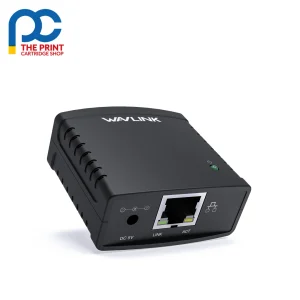
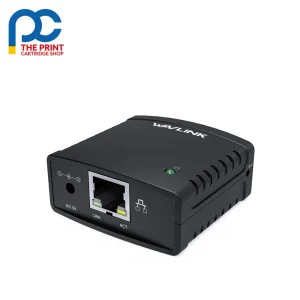


The Wavlink NU72P11 is a USB 2.0 network print server that connects a USB-only printer straight to your router or switch, so every computer on the network can print to it. It has one USB 2.0 Type-A port for the printer and a 10/100Mbps auto-sensing Ethernet port, uses the standard LPR/LPD protocol, and works with Windows and macOS 10.7 or later.

Sharing a USB printer normally means one computer has to stay switched on and logged in for everyone else to print. The Wavlink NU72P11 removes that host computer altogether by putting the printer directly on your wired network. Each PC and Mac then prints independently, at any time, and the print server queues jobs and sends them to the printer one at a time. It is a low-cost way to keep using a dependable USB inkjet or laser printer instead of replacing it with a network model.
Who is the Wavlink NU72P11 for?
The Wavlink NU72P11 suits homes with two or three computers sharing a printer, home offices, small businesses with up to around ten computers, retail counters, schools, libraries and government offices. Connect the power adapter, plug your printer's USB cable into the server, and connect the server to your router with the included Ethernet cable. Open the web configuration page from any browser, then install your printer's normal driver on each computer and point it at the print server's IP address. Wavlink estimates setup takes about 10 minutes.
Wavlink NU72P11 key features
- Share one USB printer over LAN: Connects a USB-only printer to your Ethernet network so every computer can print to it, with no host PC that has to stay powered on and logged in.
- 10/100Mbps auto-sensing Ethernet: A 10Base-T/100Base-T auto-sensing RJ45 port works with any home or office Ethernet network and is more than fast enough for typical print data.
- LPR/LPD printing: Uses the universal LPR/LPD printing protocol supported by Windows and macOS, with the server queuing incoming jobs and sending them to the printer one at a time.
- Web setup with DHCP and Auto IP: Configure, monitor and reset the print server from a browser-based interface. DHCP and Auto IP support mean network settings are configured automatically on most networks.
- No server-side driver: The print server itself needs no driver. Simply install your printer's standard driver from the manufacturer's website on each computer and point it to the print server.
- Compact 37g design: At 54 x 54 x 25 mm and 37g, the Wavlink NU72P11 tucks neatly behind the printer or under a desk, with a 100cm Ethernet cable and 120cm power cable included.
Wavlink NU72P11 specifications
| Model | WL-NU72P11 |
|---|---|
| USB | 1 x USB 2.0 Type-A (printers only) |
| Ethernet | 1 x 10/100Mbps RJ45, 10Base-T/100Base-T auto-sensing |
| Protocol | LPR/LPD |
| Configuration | Web GUI, DHCP, Auto IP |
| Compatible printers | Most USB inkjet, laser, needle and multi-function printers (printing only) |
| Operating systems | Windows 11/10/8.1/8/7/XP/Vista, Windows Server 2003/2008/2012, macOS 10.7 or later |
| Material / colour | ABS plastic, black |
| Dimensions | 54 x 54 x 25 mm |
| Weight | 37g |
| Cable lengths | Ethernet 100cm, power adapter 120cm |
Full technical details are available on the official Wavlink product page.
What’s in the box with the Wavlink NU72P11
- 1 x Wavlink NU72P11 network print server
- 1 x Power adapter (120cm cable)
- 1 x Ethernet cable (100cm)
- 1 x Quick start guide
Wavlink NU72P11 FAQs
Will the Wavlink NU72P11 work with my printer?
It supports most USB inkjet, laser, needle and multi-function printers from brands like HP, Canon, Epson, Brother and Samsung. Check the printer compatibility list in Wavlink's product documents before buying. Multi-function printers can print only; network scanning is not available.
Does the Wavlink NU72P11 work over WiFi?
No, it is a wired print server. It connects to your router or switch with an Ethernet cable. Any computer on that network, whether it is connected by cable or WiFi through the same router, can then print to the shared printer.
Can I connect a USB drive or hub to it?
No. It is a dedicated print server, and Wavlink advises against connecting hard drives, USB flash drives, card readers, phones or tablets. Only USB printers are supported. You will also need your printer's own USB cable, which is not included with the print server.
Can several computers print at the same time?
Yes. All computers on the network can send jobs, and the print server queues them and sends them to the printer one after another. It works well for homes and small offices with about 2-10 computers; very busy offices may suit a network-native printer better.
Why buy the Wavlink NU72P11 from The Print Cartridge Shop
We are an Australian online store, and every Wavlink NU72P11 we sell is a genuine Wavlink product. Orders are packed within 1–2 business days and sent with tracking to every Australian state under our shipping policy. You can return a change-of-mind purchase within 30 days under our returns policy, and faulty items are covered by the Australian Consumer Law.
Browse more Wavlink wireless networking equipment or see all products from the Wavlink brand. Not sure the Wavlink NU72P11 suits your setup? Contact our team and we will help you check before you order.


Reviews
There are no reviews yet